Stream Channel 4 privately with VPN Super

Encrypted streaming on public Wi-Fi. Throttle-resistant on slow ISPs. A stable connection to your home network, even while you travel.

Get VPN Super
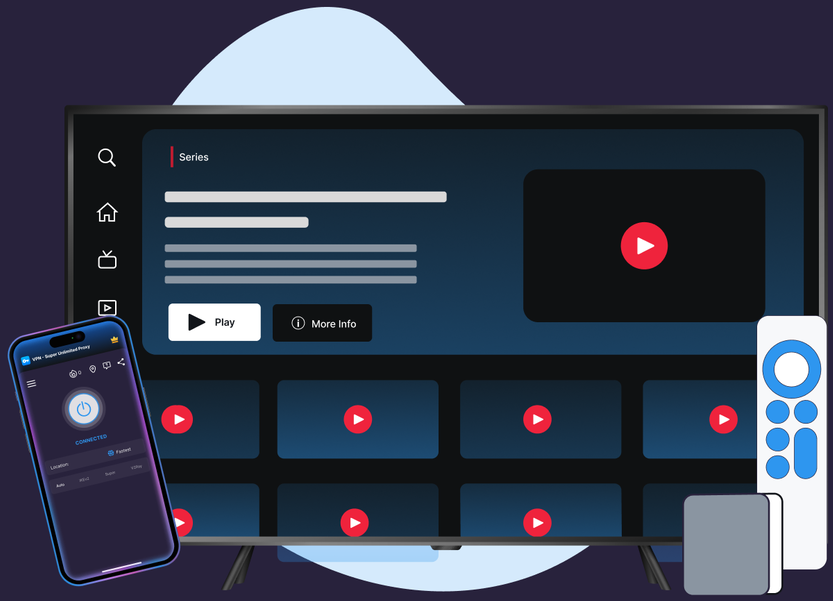
Smart TV screen showing a video streaming interface with series options and play buttons, accompanied by a smartphone displaying a connected VPN app and a remote control beside the TV.

Watch Channel 4 with VPN Super

Protocols, leak protection, and platform coverage chosen for streaming reliability and privacy.

Servers picked for speed

VPN Super's Fastest Location auto-picks the lowest-latency server for you, so you're not guessing which one to choose.
Illustration of a smartphone with a search bar above the screen and a large magnifying glass over the bottom left of the phone, with decorative leaves in the background.

10Gbps network

10Gbps servers are available in many locations, built to keep up with high-bitrate streaming.
Illustration of a laptop displaying a speedometer with the needle pointing to the right; icons of a photo, a video play button, and a heart float around the laptop.

Unlimited bandwidth

No data caps. Stream as much as you want, for as long as you want.
Smartphone with a yellow lightning bolt on the screen surrounded by floating icons including a play button, a heart, and a photo image symbolizing bandwidth or fast digital media access.

Up to 10 devices

Cover your phone, laptop, and TV on one subscription, up to 10 devices at once.
Illustration of a smartphone with a blue shield and white checkmark on its screen, positioned in front of a laptop with a blue keyboard and light blue screen, with green leaves in the background.

60+ countries, 100+ locations

Premium unlocks 60+ countries and 100+ server locations. Free tier on iOS and Android includes a solid starter list to try first.
Illustration of a globe displayed on a rectangular screen with four blue map location pins marking different areas on the globe, with green leaves in the background.

Encrypted, end to end

VPN Super encrypts your connection end to end, so your session stays private on public Wi-Fi, hotel networks, and anywhere else you connect.
Illustration of an open laptop with a padlock and wireless signal icon above it, symbolizing secure Wi-Fi or encrypted connection.
Get VPN Super

Connect in three steps

No unfamiliar settings, no complicated setup. Just connect and watch.

1
Download VPN Super
Download VPN Super for iOS, Android, Windows, Mac (Beta), Apple TV, and Android TV.
Person standing beside phone with cloud download icon and installing progress bar on screen.
2
Connect to a fast server
Tap Fastest Location at the top of the server list, or pick a UK server. VPN Super picks the lowest-latency option automatically.
Person leaning on stacked servers with cloud sync icon above, checking phone.
3
Open Channel 4 and start streaming
Your session is encrypted end to end—privacy and throttle-resistance on every platform VPN Super ships.
Man taking selfie with thumbs up and woman texting, with social media heart and chat icons around them.
blue light-bulb icon
Pro tip:

If Channel 4 flags your connection, switch protocols (Auto → Super → IKEv2 → OpenVPN on mobile; WireGuard or OpenVPN on Windows) and reconnect to a UK server.

Get VPN Super

Why Channel 4 isn't available everywhere

Honest answer: Channel 4 licenses its catalog for UK viewers only, and that's decided by broadcasting rights—not by VPN Super. Here's what that means, and what VPN Super can actually help with.

Licensing, not access illustration
It's about UK broadcasting rights, not access

Channel 4 is a free, advertising-funded public service broadcaster licensed to show its catalog in the UK. That's true with or without a VPN—a VPN doesn't grant streaming rights Channel 4 hasn't licensed for a given region.

What Netflix says about VPNs illustration
No official Channel 4 guidance on VPNs

Channel 4 doesn't publish guidance on VPN or proxy use, so VPN Super won't quote one. What VPN Super does promise is an encrypted connection—not a change to what any broadcaster licenses.

What VPN Super helps with illustration
What VPN Super helps with

Privacy on public Wi-Fi, throttle-resistance on slow ISPs, and a stable connection back to your home network while traveling—the parts of streaming a VPN can actually improve.

Icon of a blue light bulb with a filament inside.
Netflix Help Center

"With a VPN, you may only be shown TV shows and movies Netflix has worldwide licensing for."

Get VPN Super

A global network, built for privacy and speed

A sample of VPN Super's server locations—chosen for coverage and low latency, not for content access.

Illustration of the Statue of Liberty in blue beside a circular icon of the United States flag with stars and stripes on a light blue background.

United States

Illustration of the UK flag in a circle beside a flat design of London's Big Ben clock tower on a light blue background.

United Kingdom

Canadian flag depicted in a roundel next to a stylized representation of a tall tower with a blue spherical observation deck and a red antenna light on top, against a light blue background.

Canada

Illustration of the German flag as a circle with horizontal black, red, and yellow stripes next to the Brandenburg Gate monument on a light blue background.

Germany

French flag depicted as a circle with blue, white, and red vertical stripes next to a simplified blue illustration of the Eiffel Tower.

France

Illustration of the Japanese flag with a red circle on a white background next to a stylized, multi-tiered golden pagoda against a light blue background.

Japan

Illustration of the Australian flag inside a blue circle above stylized blue shapes representing the Sydney Opera House on a light blue background.

Australia

Illustration of the Netherlands featuring a round flag with horizontal red, white, and blue stripes next to a yellow windmill with red blades on a light blue background.

Netherlands

Get VPN Super

Direct connection vs.

VPN Super

What changes when you add VPN Super to your Channel 4 streaming session.

Features
Without a VPN
VPN Super
Public Wi-Fi privacy
Traffic is visible to the network you're on
Encrypted end-to-end
ISP throttling
May slow streaming at peak hours
Traffic shape is hidden—harder to throttle
Leak protection (DNS/IPv6)
Not applicable
Available on supported platforms—see device pages for per-platform status
Channel 4 catalog
Determined by Channel 4's UK broadcasting license
Same catalog—unchanged by VPN Super.
Devices covered
One connection at a time
Up to 10 devices on one VPN Super subscription

Available on every major device

Download VPN Super on the platforms you actually use to stream Channel 4 at home and on the go.
Apple logo above lowercase text iOS on a white rounded square background.Green Android robot head icon above the word Android in black text.Card showing green Android TV logo with bold text Android TV below it on white background.Apple TV logo showing the Apple icon followed by the letters TV and text Apple TV below.Blue Windows logo with four squares and the text Windows below it on white background.Beta label above the Mac Finder app icon with a blue and white smiling face.
See Premium plans

Why people love streaming with VPN Super

“
★★★★★
"Fast, reliable, and works where others don't. Works across Asia, even China. Great for public Wi-Fi."
Cer Veza
January 2026
“
★★★★★
"A lifesaver abroad! Fast, reliable, and secure. Access all your apps anywhere."
Acid_Cowboy
October 2025
“
★★★★★
"Amazing protection for a VPN. Switch servers worldwide, no ads, and a simple interface, high quality and easy to use."
Rob-Roy MacNaughton
December 2025

Frequently asked questions

Why use a VPN while streaming Channel 4?

Three reasons that don't depend on changing what Channel 4 shows you. Privacy on public Wi-Fi—café, airport, and hotel networks leak traffic by default. Throttle-resistance—some ISPs slow streaming at peak hours, and an encrypted tunnel hides the traffic shape. Travel—keep your home UK connection reachable when you're on a different ISP abroad.

Does Channel 4 block VPNs?

Channel 4 is licensed to stream in the UK only, and its systems can detect VPN and proxy traffic. VPN Super doesn't promise to change what Channel 4 shows outside the UK—it focuses on privacy and connection reliability instead.

Why does Channel 4 say I'm using a VPN when I'm not?

Common causes—your ISP routes traffic through a regional gateway Channel 4 has flagged; you're on a corporate or campus network; you have a system-level VPN or proxy running you forgot about. Open the app menu (☰) and contact Support if it persists.

Is using a VPN with Channel 4 legal?

Using a VPN is legal in most countries (rules vary—check yours). Channel 4's own Terms of Service govern what you can do with its service. Check both your local laws and Channel 4's terms.

Will a VPN slow down my Channel 4 streams?

A well-built one won't noticeably. VPN Super's servers are sized for streaming, and the app picks the server with the lowest current latency for you. A weak underlying Wi-Fi or mobile signal can still cause buffering.

I'm a UK viewer traveling abroad—can I still watch my Channel 4 account?

This is one of the most common reasons people search for a Channel 4 VPN, especially from outside the UK. If you're already registered with a UK postcode, hotel and roaming networks abroad can route you through non-UK gateways that break that connection. VPN Super's UK servers keep your home network in reach, so the account you already have stays usable while you travel.

Does the free VPN work for Channel 4 streaming privacy?

Yes. VPN Super's free VPN on iOS gives 20 countries and 42 locations; Android's free VPN gives 15 countries and 26 locations. The encrypted tunnel is the same as Premium—useful for public Wi-Fi privacy and throttle-resistance without paying.

How do I set up VPN Super for Channel 4?

Install VPN Super on iPhone, Android, Windows, Mac (Beta), Apple TV, or Android TV. Sign in, tap Fastest Location or choose a UK server, and connect. Open Channel 4 as usual—your session runs through an encrypted tunnel from there.

How many devices can I cover with one subscription?

Up to 10 devices at the same time. Enough for a personal phone, a laptop, a tablet, an Apple TV or Android TV, and a few more besides.

Free on mobile, Premium for desktop and TV. One VPN Super subscription protects up to 10 devices.
Get VPN Super
Blue money-back guarantee seal with three stars and a ribbon banner